
Make the evidence easy to find and review.
A startup fundraising data room should organize company and ownership records, financial evidence, material agreements, intellectual property, people records and relevant tax or regulatory documents. Give each item an owner, current version, review status and sharing decision. Prepare a small introductory packet first, then share deeper evidence as the investor’s process requires it.
A data room is a controlled collection of supporting documents. It helps a reader trace a claim in your deck to the record behind it. The quality comes from accurate, understandable records and appropriate access, rather than the number of files uploaded.
The checklist below is our practical organization framework for an early stage company. The exact documents depend on the entity, jurisdiction, business, financing instrument and investor request list. Cooley GO’s US sample request list illustrates how legal diligence reaches beyond a pitch deck into company records and agreements. Treat any generic list as a starting point to adapt.
You do not need to resolve every item before speaking to an investor. You do need to know what exists, what is missing and what you are claiming. A draft contract, a signed contract and a summary of that contract answer different questions.
1. Prepare three packets for different conversations.
Use these packets to plan disclosure. They are an organizing method, not mandatory gates. An investor may request an item earlier, and you may decide that sensitive material needs additional controls or a different way to answer the question.
For an initial conversation
Prepare the current deck, a dated summary of the metrics discussed, the funding ask and an assumptions summary. Keep the financial model available for questions. Share enough to make the discussion useful without opening every employee record or customer contract to every prospective investor.
For active evaluation
Use the investor’s actual request list to select deeper records. Reconcile the cap table, financial actuals and customer definitions with what you have already presented. Prepare a response register so that each question points to a current file, an explanation or a named gap.
For closing
Keep a separate folder and condition tracker for the documents agreed with the deal team. Distinguish proposed terms, circulated drafts, approved documents and executed copies. For a US venture financing, NVCA’s model document set shows examples of financing agreements. These are starting points for tailoring, not a universal closing pack. The required approvals and filings belong to the specific transaction and jurisdiction.
2. Build a folder structure you can explain.
Start with the seven folders below and a root index. Keep a separate closing workspace when a transaction is underway. The examples are illustrative; they do not require every company to produce every document. Add items relevant to your business and record why a category does not apply.
| Folder | Prepare and identify | Check before sharing |
|---|---|---|
| 01 Company | Entity records, current governing documents, relevant approvals and a record of group entities. | Correct entity, current amendments and completeness of the selected records. |
| 02 Ownership | Dated cap table, securities records and existing investment or equity arrangements. | Sources agree with the ownership summary; unresolved differences are explained. |
| 03 Financial evidence | Actual results, cash position, forecast, assumptions and metric definitions. | Currency, reporting period, actual versus forecast and reconciliation status. |
| 04 Tax and regulation | Relevant filings, registrations, licences and a record of matters being reviewed. | Applicable requirements confirmed for the entity and business; open issues named. |
| 05 Intellectual property | Records supporting ownership or permitted use of the product’s important IP. | Missing signatures, third party rights and restrictions that need review. |
| 06 People | Relevant team, employment, consulting and incentive records. | Personal information minimized and access limited to the appropriate reviewers. |
| 07 Commercial evidence | Material customer and supplier records, operating evidence and research sources. | Executed versus proposed agreements, definitions and confidentiality restrictions. |
Put an index at the root so that a new reader understands the structure, reporting date and contact for questions. If there are several entities, identify which one owns each record. An agreement signed by a subsidiary should not silently become evidence for the parent company.
For a company without revenue, show the evidence you actually have: product tests, customer research or accurately described pilots. Record that historical revenue is absent. Do not turn planned contracts or an unsigned letter into achieved sales to fill a folder.
For financial material, keep the period and definition visible. A September operating dashboard, an August accounting report and a forward forecast may all be useful, but they answer different questions. Explain the timing differences and any reconciliation still underway.
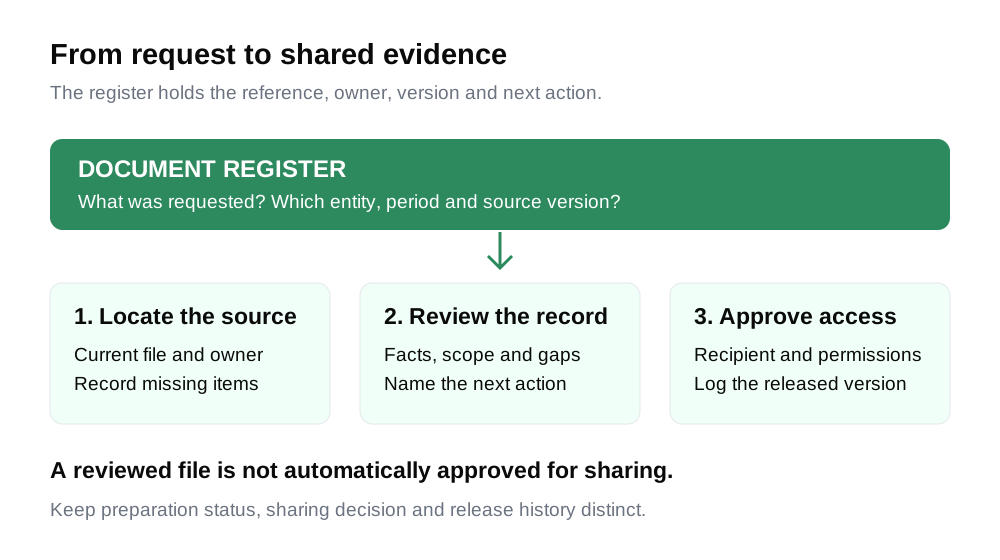
3. Keep a document register beside the files.
A folder alone does not tell you who last checked its contents. Use a register with one row per document or clearly defined request. Assign a stable reference so you can update the source without losing the question it answers.
- Reference and request: what the reader is asking for.
- Entity, period and version: which company and date the record covers.
- Owner and reviewer: who gathers the record and who checks it.
- Preparation status: missing, being prepared, reviewed or not applicable with a reason.
- Sharing decision: hold, share a summary, share a redacted copy or share the approved file.
- Location and next action: where the source sits and what remains to be done.
Use dates and versions in filenames, for example Northstar_CashForecast_2026_09_30_v03.xlsx. Keep the underlying editable source separately from the copy released to an investor. If a file changes, update the register and tell the relevant reviewer which version supersedes the earlier one.
Copy a document record
REFERENCE: FIN_03
REQUEST: Latest cash forecast and assumptions
ENTITY: Northstar Cloud, Inc. (fictional)
PERIOD / AS OF: 30 September 2026
SOURCE VERSION: Northstar_CashForecast_2026_09_30_v03.xlsx
OWNER: Maya, finance lead (fictional)
REVIEWER: Leo, founder (fictional)
PREPARATION STATUS: Reviewed for the stated purpose
SHARING DECISION: Hold until recipient and access are approved
LOCATION: 03_FinancialEvidence / current version
OPEN ITEM: Confirm the selected recipient group
LAST REVIEWED: 2 October 2026
NEXT ACTION: Test investor access to the approved copy
Fictional example. Replace all company, file and review details.
The blank register includes a row for each starter folder. These downloads are organization aids, not legal forms. They contain no real customer or investor records.
4. Work through a readiness example.
Suppose the fictional Northstar Cloud team has an investor asking for a current cap table, September financial results, the cash forecast, a material customer agreement and evidence of IP ownership. The founder finds five files, but the review shows five different states.
| Record | What the team finds | Next action |
|---|---|---|
| Cap table | Current export exists; one grant differs from the supporting record. | Reconcile the difference and label the draft until reviewed. |
| September results | Report exists; revenue reconciliation remains open. | Finish the reconciliation or explain the provisional figures and their limits. |
| Cash forecast | Model and assumptions were reviewed together. | Confirm recipient access before releasing the selected copy. |
| Customer agreement | Executed copy exists and includes confidentiality terms. | Review disclosure permissions and prepare an appropriate copy or summary. |
| IP record | A contractor’s assignment record has not been located. | Assign an owner to investigate; record the gap rather than marking it ready. |
The useful result is a short action list. Leo resolves the ownership mismatch, Maya reviews the revenue reconciliation, and the company’s legal adviser reviews the agreement and missing IP record. Each task has a target date and a clear completion condition. Finding another file with a similar name does not close a gap.
“Legal folder nearly done.”
“IP_04: contractor assignment record not located. Leo to confirm the source with the contractor and adviser by 7 October. Do not describe the assignment as verified.”
“Not applicable” also needs a reason. For example, a request for a debt agreement may be inapplicable if the company has no such borrowing, after checking its records. An agreement that should exist but cannot be found is a missing item. Do not use N/A to remove an inconvenient gap from a readiness score.
5. Review the sharing decision separately.
Keep gathering evidence even while some disclosure decisions are unresolved. Before sharing, identify the recipient, purpose, selected files, download permissions and access period. Check whether the documents contain personal information, commercial restrictions or material that should be reviewed with an adviser.
Use the storage provider’s access controls to grant the intended people access. Test the link from an account with the recipient’s permissions, rather than only opening it as the folder owner. Check whether subfolders inherit access and whether a downloadable copy is appropriate. A link that works for you may still fail for the investor or expose more than intended.
A confidentiality agreement may be appropriate for particular disclosures, but do not assume every investor will sign one before an introductory conversation. Agree how to address sensitive requests. A high level summary or a reviewed redacted copy may answer an early question; retain the source and record what was omitted.
When material changes, maintain a short release log: reference, old version, new version, change and recipients informed. After the process ends, review ongoing access. Removing a link’s access does not retrieve copies already downloaded.
How to use DDLab to track preparation.
DDLab is a preparation checklist. It helps you organize statuses and notes. It does not upload your files, host an investor data room or verify legal compliance. The screenshots below come from the existing scripted capture of fictional Northstar Cloud, Inc.; they show the real interface with invented preparation data.
1. Choose the region and stage that fit the company.
The full tool has separate India, United States and Singapore checklists, with Pre-seed and Seed views. Choose the applicable company context and compare the list with the actual investor requests. Changing the account’s region can affect other tools, so check the selected context before switching.

2. Mark the status and explain the next action.
Reading the checklist is public. Changing readiness statuses requires an account. Click a status pill to cycle through Not started, In progress, Ready and N/A. Add a concise note naming the source, owner or remaining gap. Keep the actual documents in the storage system you have chosen.
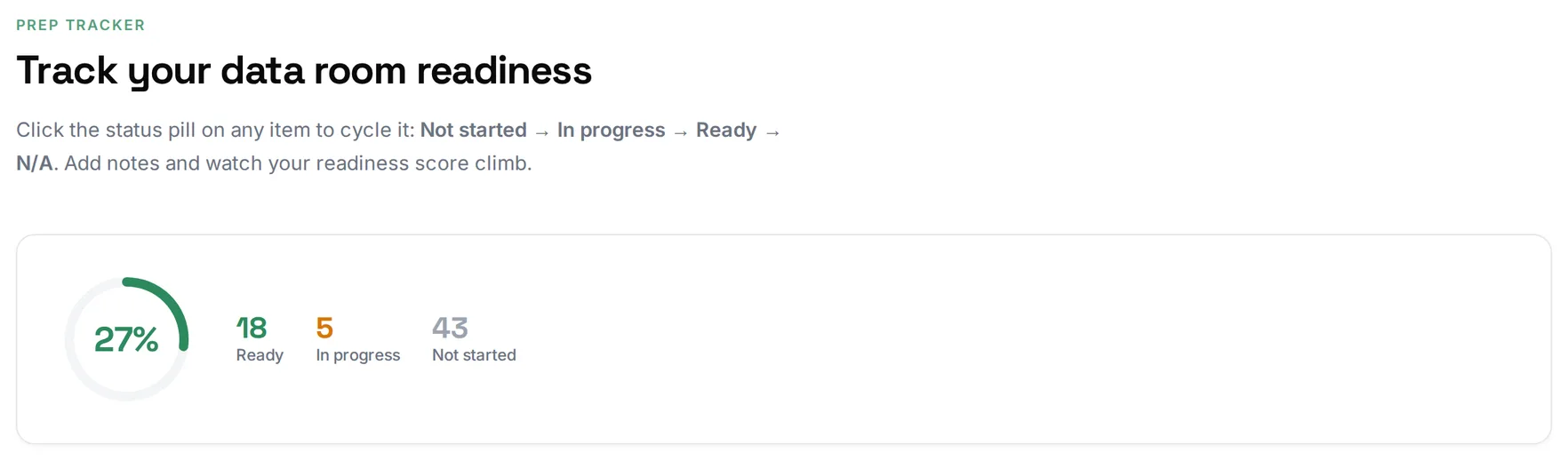
The readiness percentage reflects items marked Ready among applicable items for the selected checklist; N/A items are excluded. Review applicability rather than using the number as a target. One missing document can matter more to a specific transaction than many completed items.
The current implementation keeps tracker statuses and notes in this browser, with account database saving for eligible paid or trial access. Check your account’s access and whether the data is available where you need it before relying on it across devices. This full tool tracker is distinct from the free saved preview below.
3. Use the ZIP as a folder scaffold when available.
Eligible paid or trial accounts can download a stage and region specific ZIP containing seven folders, guidance READMEs and a master checklist. Populate it with your reviewed records in your own storage. It does not generate executed agreements or create a hosted sharing link.
Read the folder guidance in context and confirm current requirements with the people reviewing your transaction. A folder scaffold helps organize preparation; it does not certify that the resulting data room is complete.
Try the document readiness preview.
Select which of seven broad document categories you have ready. A free account lets you view and save one readiness checklist and revise it. The result is based on your selections; it does not inspect files or calculate the full tool’s item level readiness score.
Your result
Enter the details to see what this preview can help you work through.
Your inputs are ready.
Create a free account or log in to view and save the result. No payment required.
Continue with the complete workflow in DDLab.
Explore DDLab →Before sharing a data room
These selections remain on this page and reset on reload. They record your own review; they do not inspect the underlying documents.
0 of 8 reviewed
Common questions
Do I need a complete data room before the first investor meeting?
Prepare a clear introductory packet and know where the supporting records are. The investor’s process determines when deeper evidence is requested. Start addressing important gaps early, while separating document preparation from the decision to share sensitive material.
How many documents should a seed data room contain?
There is no universal count. The right set depends on the company, transaction and actual requests. A tool’s checklist count describes its selected list, rather than a legal threshold or proof of readiness.
Does DDLab store my documents?
No. The full tool tracks preparation statuses and notes and can provide a folder ZIP for eligible accounts. Store the actual files and manage investor access in your chosen document system.
What if a requested document is missing?
Record the gap, assign an owner and identify the next action. Explain it to the appropriate reviewer. Distinguish a record that cannot be located from an item that truly does not apply; do not silently replace missing evidence with a summary that claims it was verified.
Can a generic checklist confirm compliance?
No. It can help identify categories to review. Current legal, tax and regulatory requirements need to be assessed for the company’s actual circumstances, and deal specific closing requirements must be confirmed with the transaction team.
Sources and further reading
Sources reviewed on 3 October 2026. The packet method, document register and Northstar examples are our educational organization framework. They are not a prescribed legal request list.
- Cooley GO: Sample VC Due Diligence Request List and its linked four page PDF. US corporate and legal diligence examples; applicability and current requirements must be assessed for the actual company.
- NVCA: Model Legal Documents. Examples of venture financing documentation, described by NVCA as starting points to tailor. A model agreement is different from an executed company document.
- DDLab overview. Preparation workflow; the screenshots use the fictional capture described above.